Friday, 6 May 2016

Discovering 'Makey Makeys'


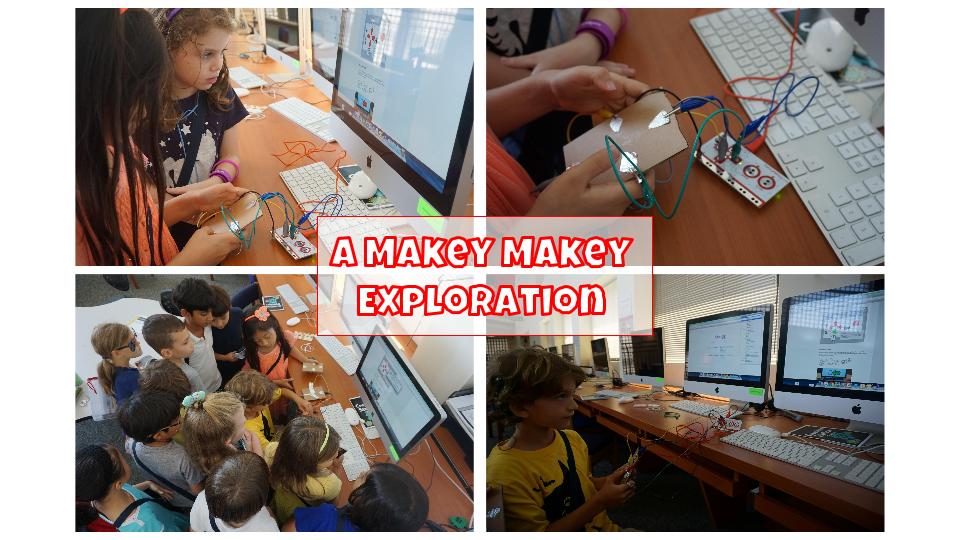
A few students in Miss Kumar's class decided to undertake a Makey Makey exploration for their scheduled time at Creation Stations.  They began simply by opening the box, connecting the Makey Makey to a desktop computer, and following the directions on the How to page on the Makey Makey website (http://makeymakey.com/how-to/classic/). Step 5, 'Play some Makey Makey drums!' required collaborative problem solving as the students Makey Makey seemed to only work some of the time.  They discovered that they drums wouldn't play if they didn't have the Makey Makey grounded. Once they solved that problem the drum sounds were abundant.  


After that, these two students designed their own drum controllers using small cardboard rectangles, tin foil, and glue.  Their were so excited about their accomplishments that several other students from the class were intrigued to learn what they had discovered.  


They quickly crowded around the computer for a short 'show-and-tell' about the station.  I look forward to seeing how many different students will be interested in this Makey Makey station when Miss Kumar's class arrives again next week.


Thursday, 5 May 2016

Discovery Time Sewing

Ms. Analu's class has been diligently working on their passion projects for months.  Some students have successfully completed 1-2 cycles of the personal time inquiry while the sewing group has persevered with completing their first cycle of learning over this four month period.   Today, several of this group's members accomplished their goal of sewing a stuffed toy!  They were so excited to have a finished stuffed animal that they made all by themselves.  I was so proud of the students' ability to work hard and to not give up even when they observed classmates tasting success with their projects and moving on to other discoveries.


Monday, 25 April 2016

Make a Digital Map of Singapore

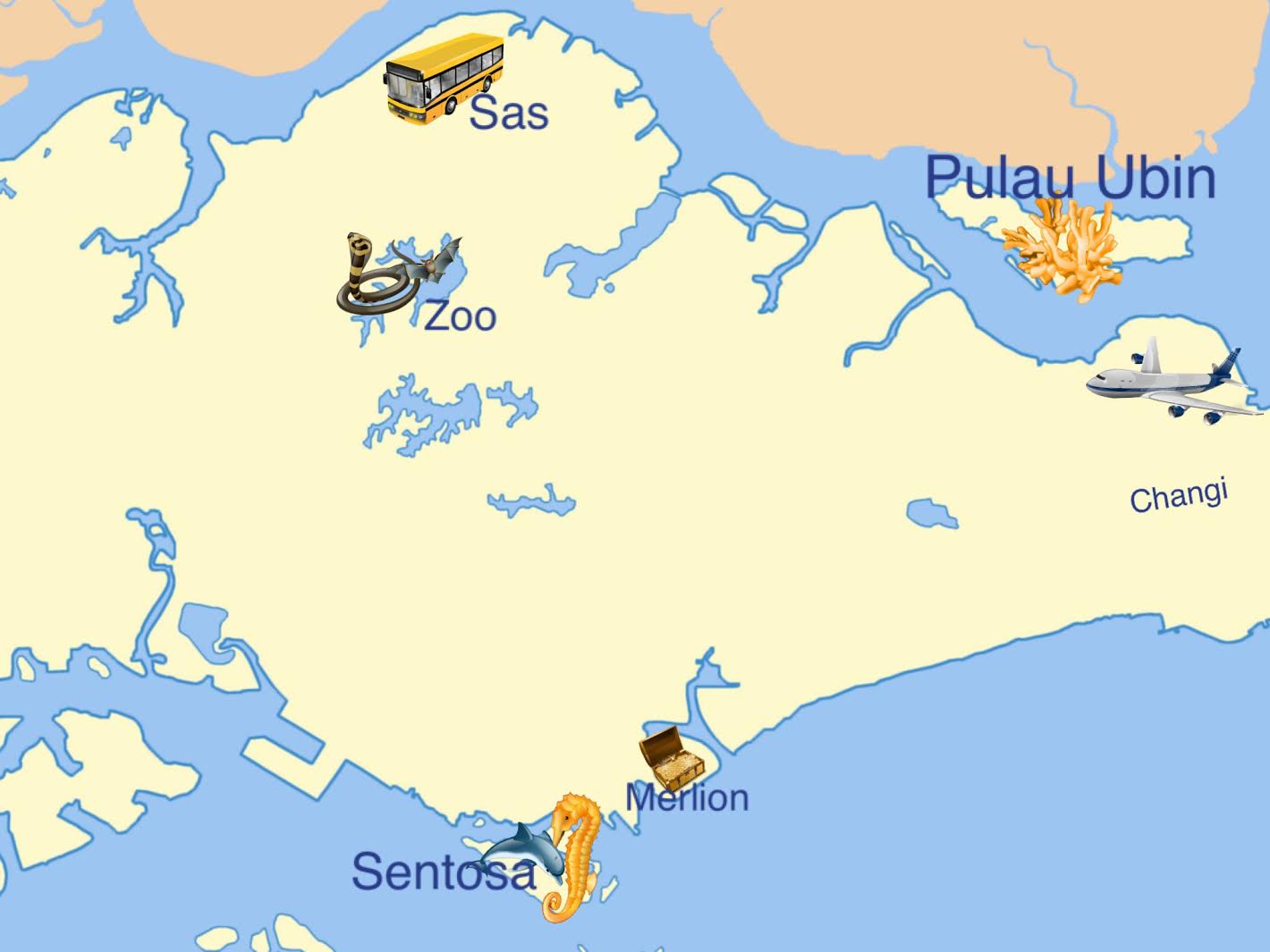
Grade 1 students are learning about popular destinations and landmarks in Singapore for part of their Social Studies unit.  During this particular lesson, students began activating prior knowledge and growing their knowledge in a fun partner whiteboard quiz.  Locations are called out and partnerships have to look at a map with numbered destinations on it.  Students decide which number represents that location and writes it down on their whiteboard.  The teacher then shares the correct number that correlates with that location.  After all of the locations are discovered, students use the app of their choice to make a map of Singapore and include a minimum of 3 landmarks discussed in the beginning of the lesson.

Here are some student samples:


Google Map for Reference

Tuesday, 12 April 2016

Lego WEDO 2.0

Grade 1 students in Mrs. Kelly's class trialled our new Lego WEDO 2.0 kits last week.  Students worked in collaborative pairs to build a Lego rover robot, program the robot to move forward, and then wirelessly control the rover through their ipads.  Their ability to work together, troubleshoot, problem solve, and achieve success was exciting to observe!

Monday, 11 April 2016

Showing Data Digitally

Students in Grade 1 have begun their data unit in math.  They have learned how to collect information through surveys and explored how to show the data using real life objects (i.e. shoes for a shoe graph) and also representative objects (i.e. yellow snap cubes for vanilla ice cream).  So, for tech class, students were faced with a challenge, "How can you show your data digitally?"

During the chalk and talk students brainstormed apps that would be a good tool for the job.  Pic Kids, Doodlecast Pro, and Drawing Pad are usually the first apps mentioned but after a few minutes students begin to 'see' through a wider lens and start suggesting apps such as Tiny Tap, Stop Motion, and iMovie.  As a group, we discuss apps like iMovie and try to tease out how we could make a graph in it.  Other students are quick to note that iMovie would not a good tool for creating a digital graph.

Students are then set off to 'test' out the app of their choice and see if they can make a graph with given data.  It is wonderful to see that all students are able to make a graph with the app of their choice.

Here is the lesson and some student generated samples on the last two slides.

Wednesday, 9 March 2016

Discovery Time Share


Ms. Angle's 1st Grade class has been on a personal learning adventure over the past several months called Discovery Time.  Students brainstormed their own interests, wonders, and passions first.  Then, they followed an inquiry cycle.  At the end, they shared their learning with a grade 2 class. 


Tuesday, 1 March 2016

The LOFT Creation Stations


The ES Ed Tech team has been transforming the LOFT into a creative indoor 'playground' for students where the SAS DSLOs (character, collaboration, communication, critical thinking, creativity, content knowledge, and cultural competence) are finding traction.

The learning activities are organized under 5 themes: Art, Building, Coding, Engineering, and Filmmaking. Then each theme has various stations where students can explore, make, and innovate based on Challenge Cards specific to that station.  Challenge Cards come in levels as well to take into consideration that students from ages 5-11 use this space.


In addition, students are tracking their progress with the use of a Creation Stations Passport.  They must note down which station they completed (under the correct theme) and demonstrate and/or explain to a teacher which level they accomplished.  Success is noted with an 'Explorer', 'Maker', or 'Innovator' stamp in the student's passport.    


Here is a short video of grade 1 students exploring, making, and innovating at just some of the stations.